
Attention, community managers! Remember when scheduling an Instagram post seemed almost like mission impossible?
In 2019, we celebrated the arrival of Facebook Creator Studio, a tool that finally allowed us to schedule Instagram posts from a computer. But several years have passed, and Meta’s tools have changed quite a bit.
Today, the go-to platform for managing and scheduling Facebook and Instagram content is Meta Business Suite. And the good news is that it doesn’t just allow you to schedule posts, but also Reels and Stories, check insights, and organize content in a calendar.
Want to know how it works? We’ll explain how to schedule your social media content step by step!
What is Meta Business Suite and what is it for?
Meta Business Suite is a free tool from Meta that allows you to manage a company’s presence on Facebook and Instagram from one single place.
It is the evolution of the tools we previously found in Facebook Creator Studio and incorporates various features that make the work of digital marketing professionals easier.
With Meta Business Suite you can:
- Create and schedule posts on Facebook and Instagram.
- Schedule Reels and Stories without having to publish them manually at the time.
- Organize content in an editorial calendar.
- Manage comments and messages from both platforms.
- Check insights to analyze content performance.
All of this from a single platform, available on both desktop and mobile.
How to connect Instagram and Facebook to Meta Business Suite
Before you start scheduling content, you need to ensure that the accounts are correctly configured.
To do so:
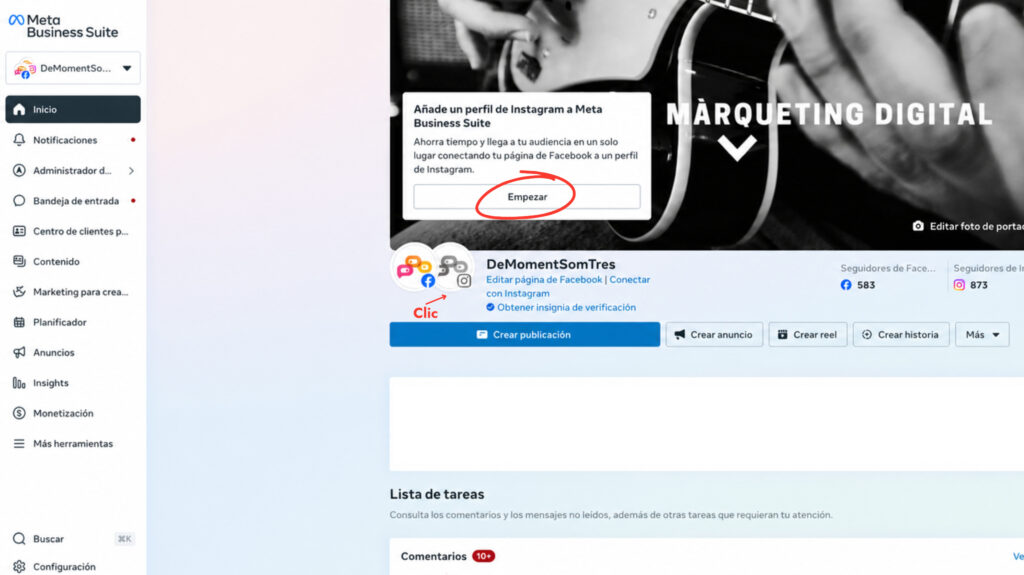
- Log in to Meta Business Suite with your Facebook account.
- Select the Facebook page you want to manage.
- Go to settings and look for the Instagram accounts or connected accounts section.
- If your Instagram account is not yet linked, select the option to connect it.
- Log in to Instagram, follow Meta’s instructions, and check that you have the necessary permissions.
Important: to manage and schedule Instagram content from Meta Business Suite, you need a professional account (business or creator) correctly connected.
Once the accounts are linked, you can start preparing your posts!
How to schedule posts on Instagram and Facebook step by step
Now, let’s get to what matters! Scheduling a post with Meta Business Suite is quite simple.
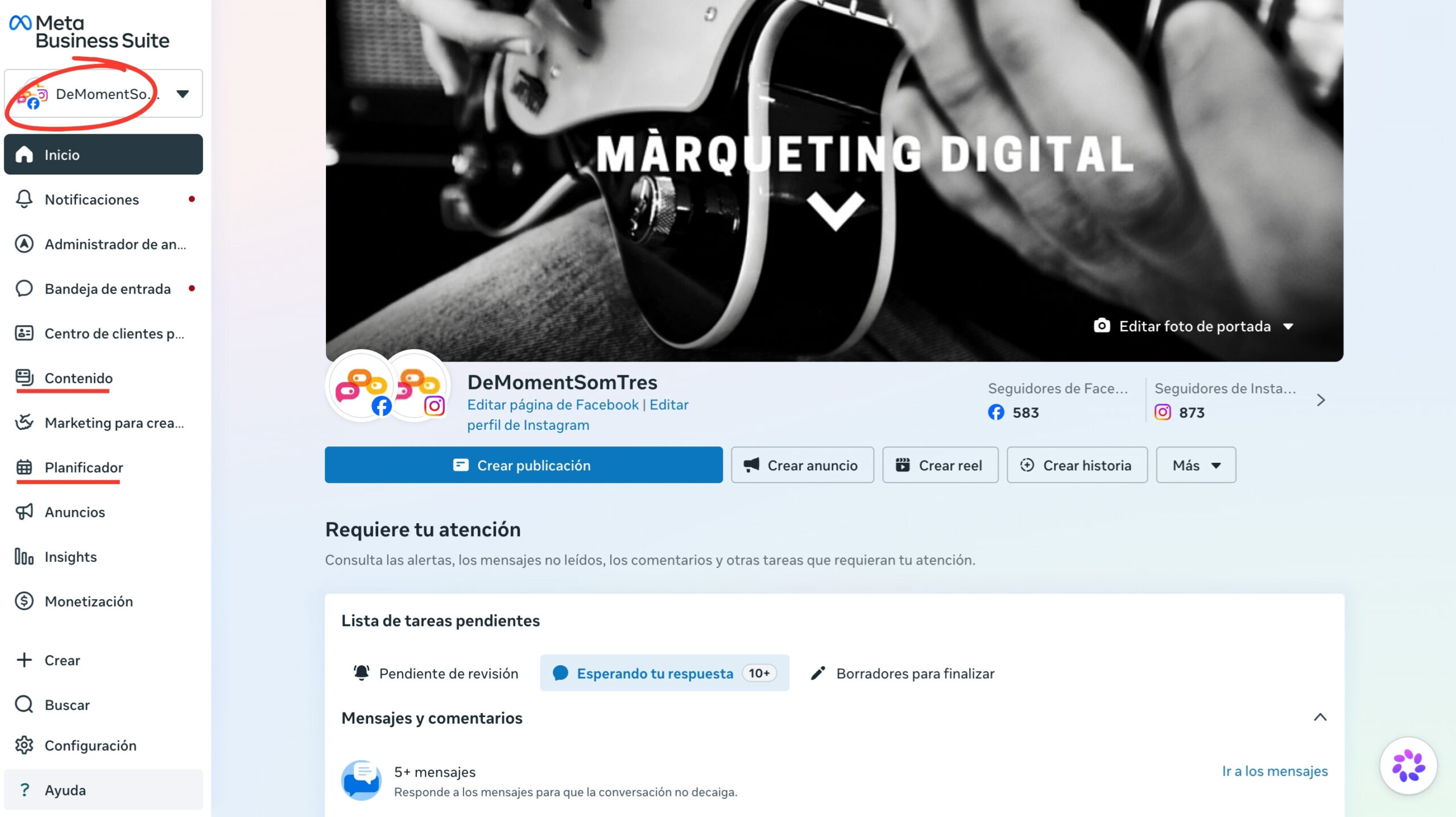
1. Access Meta Business Suite
Go to business.facebook.com and select the business or page you want to manage.
In the menu, you will find different tools, including the content section and the planner.
2. Create a new post
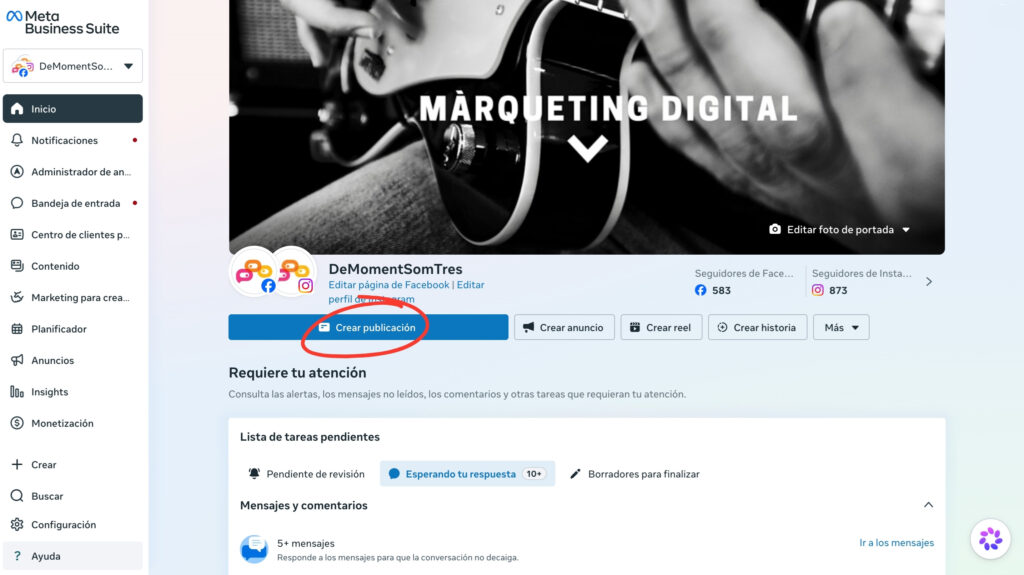
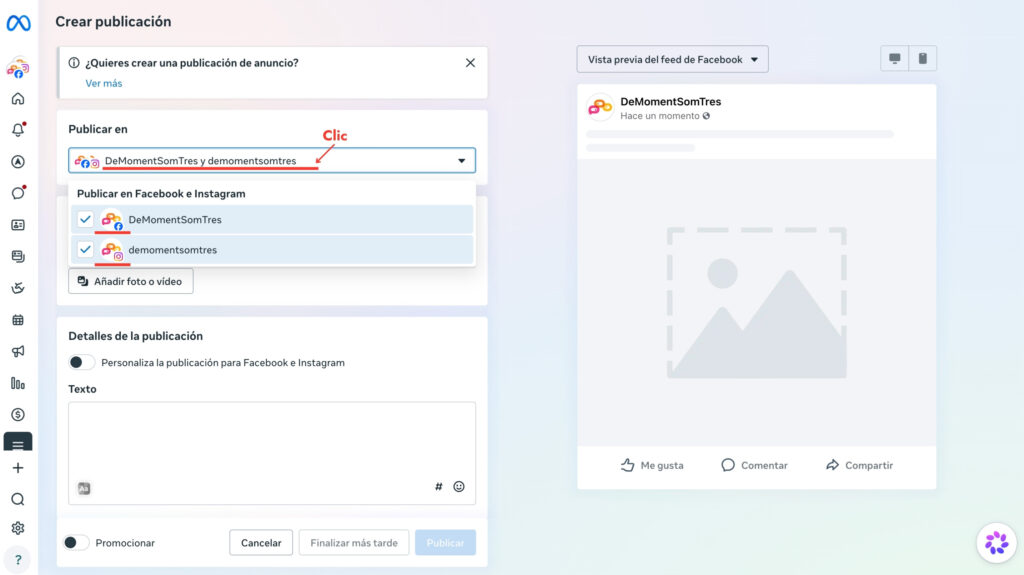
Click on “Create post”.
Select where you want to publish the content: on Facebook, on Instagram, or on both platforms simultaneously.
This option is especially practical if you manage a company’s social media and want to share content on both channels.
3. Add the content
Now it’s time to prepare the post:
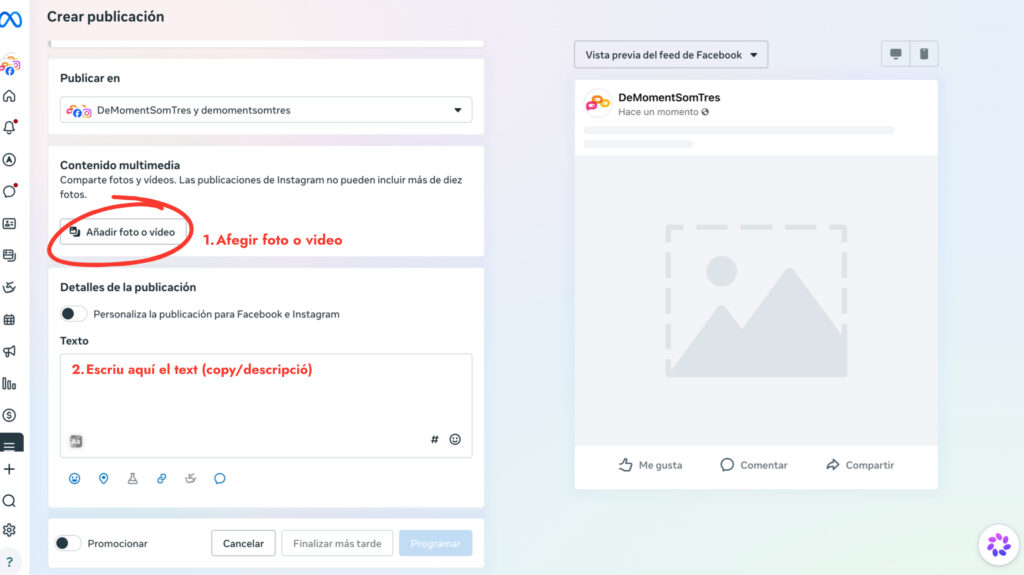
- Write the text that will accompany the content.
- Add the images or videos.
- Review the post preview.
- Adapt the text for each social network, if necessary.
A tip: even though you can publish the same content on Facebook and Instagram, it’s not always recommended to do it exactly the same way. Each network has its own peculiarities and it’s worth adapting the message.
4. Choose the date and time
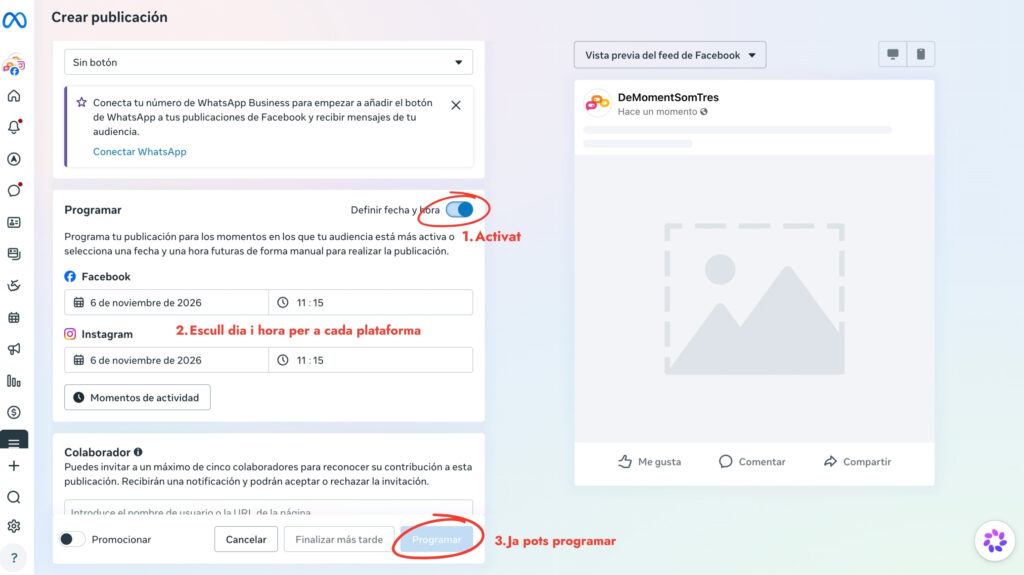
Instead of publishing immediately, look for the scheduling options.
Enable scheduling, select the day and time you want the content to appear, and confirm the action by clicking “Schedule”.
And you’re done! The post will be shared automatically at the chosen time, provided there are no issues with the account or the platform.
5. View or modify scheduled posts
Got the day wrong? Want to change the text before it’s published? No problem!
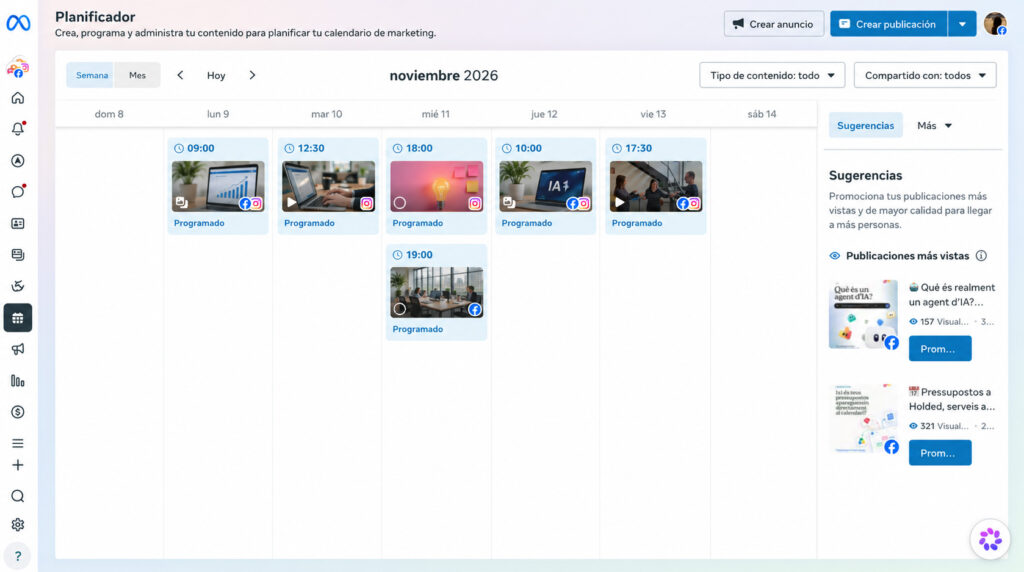
From the “Planner” section or from the list of scheduled content, you can view pending posts and, depending on the format, edit them, change the date, or delete them.
Additionally, the calendar allows you to see at a glance what content you have ready for the coming days.
How to schedule Reels and Stories with Meta Business Suite
Feed posts are no longer the only format we can prepare in advance. Meta Business Suite also allows you to schedule short videos and ephemeral content.
Schedule Reels on Instagram and Facebook
Reels have become one of the standard formats for sharing video content on social media.
To schedule one:
- Access Meta Business Suite.
- Select the “Create Reel” option.
- Choose the account where you want to publish it.
- Upload the video and add the text and available options.
- Select the publication date and time.
- Confirm the scheduling.
Keep in mind that some creative features, such as certain effects, music, or editing tools, may not be available when you schedule a Reel from Meta Business Suite.
Schedule Stories on Instagram and Facebook
You can also schedule Stories to share content at specific times without having to be on your phone.
The process is similar:
- Select “Create Story”.
- Choose whether you want to publish it on Instagram, Facebook, or both.
- Add the image or video.
- Configure the scheduling options.
- Select the date and time and confirm.
Attention! Not all interactive features of Instagram Stories are available from Meta Business Suite. If you want to add certain stickers, effects, or interactive elements, it may be necessary to prepare the Story directly on Instagram.
Can you also schedule posts directly from Instagram?
Yes! If you don’t need to manage Facebook and Instagram from a single platform, you can also schedule posts and Reels from the Instagram app itself.
To do so:
- Open Instagram and create a post or a Reel.
- Add the images, video, and text.
- Before publishing, go to “Advanced settings”.
- Enable the option to schedule the post.
- Select the day and time and confirm.
This feature is available for public accounts that meet the platform’s requirements.
However, if you manage a company’s social media, Meta Business Suite is especially useful because it allows you to centralize content, view it on a calendar, and check results from a single place.
Why can’t I schedule a post on Instagram?
If Meta Business Suite won’t let you schedule content, it could be for several reasons:
- The account is not properly connected: check the link between Instagram and Meta Business Suite.
- You don’t have the necessary permissions: review the access to the company accounts.
- The content does not meet the requirements: some formats, functions, or multimedia elements may have limitations.
- There is a temporary error: sometimes Meta experiences issues that affect the scheduling or publishing of content.
Before creating the post again, check if it has been saved as a draft or if it appears in the list of scheduled content.
Scheduling content is useful, but it doesn’t replace a strategy
Being able to prepare all the posts for a week or a month is a great advantage. It helps us organize, save time, and maintain a constant presence on social media.
But publishing regularly doesn’t guarantee that the content will work.
What do we want to achieve with our social networks? Who are we addressing? What content really interests our audience? And, above all, how do we know if we are getting results?
This is where strategy comes into play.
A good editorial calendar helps us plan what we publish and when, but it’s also important to define objectives, adapt messages to each channel, and analyze data to continuously improve.
In the end, it’s not just about having scheduled posts, but about making sure each piece of content has a purpose.
